From the days of pong and space invaders to now, I enjoy gaming. It is a great way to have fantasy fun. I also like the idea of making games.
There are times throughout the years, I would take code provided in various magazines and alter it to make my own game. I never sold anything. It was just for fun. Now that I have some free time, I think it is time to revisit that hobby. Building a game is on deck.
One item to discuss before moving on is with coding and reuse. Whatever you do, always give references when you harvest others’ code posted online or elsewhere. At the very core, it is respectful and honors the hard work someone puts into their project.
Game overview
Since learning about how to model social networks, I feel that I want to use those libraries for this project. After thinking about, I could picture a game that takes place in a dungeon that has a series of rooms attached to each other. I simply call this game, “The Warrior Network.” It is not the best name but we can change that at another time. I will respectfully note that a lot of dungeon crawling/exploring games are based on an old one named “Hunt the Wumpus.”1 Do a search online and you will find lots of code examples.
In The Warrior Network, the idea is that our hero traverses a labyrinth trying to find a beast terrorizing the local town. The Warrior enters the dungeon and is presented with a choice of rooms. Based on what the gamer says, the Warrior will move and eventually various scenarios will unfold.
Resourcing the Social Networking Library – NetworkX
For our approach, I hinted about doing something different. In this case, we are going to simulate the rooms interconnected as a techno-social network. Instead of a series of actors connected together we will use rooms.
We will also use a library named NetworkX2. Usually, this library is used for the aforementioned techno-social networking analysis (that builds on graph theory). Since it is in a Python library, we will also use Python as the coding language.
I am also going to use Google Colab. It is similar to other Python Notebook environments and is quite good if you ask me.
Why use network library vs self build?
When I first started with this game concept, I was creating lines and lines of code to where I began to feel that it was too much. Remember that after a game is released, it is up to you to keep it maintained and as free from bugs as possible.
For any coding project, resourcefulness is critical. That is why I am using libraries. This just happens to be a core reason to use Python. Remember that Python has a lot of power because of its ability to be a consumer of other coding languages via libraries. Why code everything from the ground-up when perfectly usable libraries are available?
Where to begin?
I first need a play map. I will capture some code from the NetworkX gallery3. This looks pretty simple:
import matplotlib.pyplot as plt
import networkx as nx


G = nx.gnm_random_graph(10, 20, seed=20160)
pos = nx.spring_layout(G, seed=20160)

nx.draw_networkx_nodes(
        G, pos, node_size=1000, node_color='tab:blue'
    )

nx.draw_networkx_edges(G, pos, alpha=0.5, width=6)
Output:

That looks like a dungeon map which meets the need well!
Where’s The Warrior?
I now add in a tracker to show the position of the warrior. This will have the initial values for the room as well as configure the base nodes.
#init
room = 0
move = 0
room_count = len(list(G.nodes))

node_color = ['tab:blue'] * (room_count)
labels={}
I will also add a bit of color to the room the warrior is in. This will make the occupied room stand out. To do this, I build out the node colors along with a text identifier.
   #adjust map to show where warrior is located
    node_color[room] = 'tab:red'
    labels[room] = 'warrior'

    # Plot nodes with different properties for the "wall" and "roof" nodes
    nx.draw_networkx_nodes(
        G, pos, node_size=2000, node_color=node_color
    )
    nx.draw_networkx_labels(G, pos, labels = labels, font_size=14, bbox=label_options)
   nx.draw_networkx_edges(G, pos, alpha=0.5, width=6)
This is what the network now looks like with the Warrior in it.

We now need to imagine that as the Warrior moves, the board will reset the previous room’s color and label. This code will take care of that need:
#allow moves till player quits
while move != 'q':

    #set the room to most recent choice known (note: chooser shown later on)
    room = int(move)

    #clean board (do this more pythonic)
    for x in range(room_count):
        #print(x)
        node_color[x] = 'tab:blue'
        labels[x] = str(x)

    label_options = {"ec": "k", "fc": "white", "alpha": 0.7}
(there is always room to grow with coding techniques)
Traverse the labyrinth
The warrior needs to move. I have to give the gamer options for picking the next room. Fortunately, picking out the connected room series is very simple by making a reference with a room Id:
    #Keep asking till an accurate move is made or player quits
    while int(move) not in list(G[room]):
        #show reachable rooms
        print('you can move to these rooms:')
        print(list(G[room]))

        move = input('make your move (q to quit): ')

        #escape if quiting
        if move != 'q':
            if int(move) not in list(G[room]):
                print('Not a valid option. Try again!')
        else:
          break

print('game over’)
I am not a fan of using “break” but it works here fine (note: I feel that well structured code that follows a strong algorithm is important.). Let’s try it out to see the warrior move around.
Output:
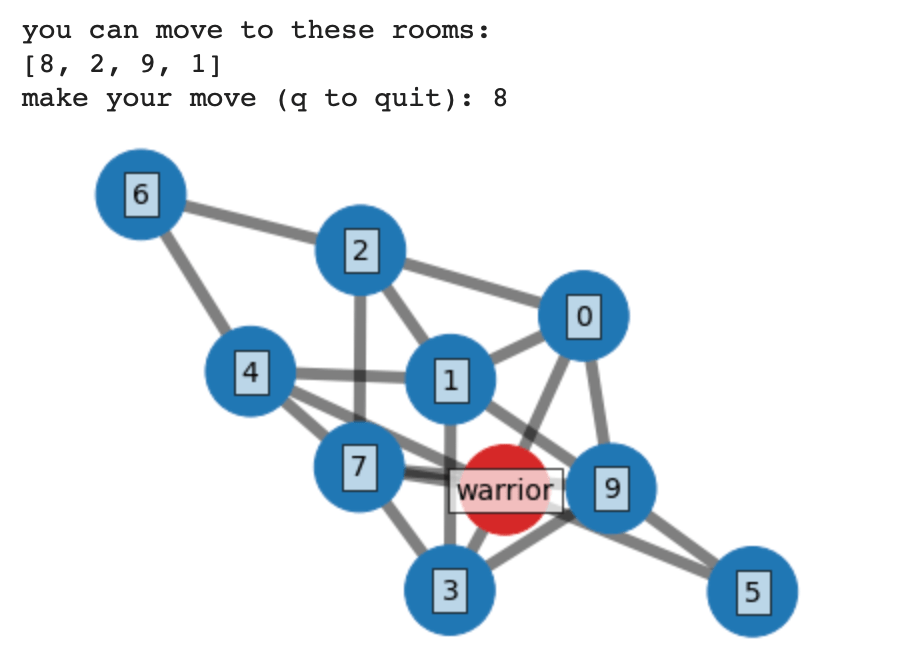

Success! The warrior moves around and the board adjusts. How easy!
Conclusion
Even though it is just a small start, being resourceful helped make this is a pretty simple base. The reason for the NetworkX library is for graph theory but we can see that a bit of imagination can repurpose it to create a dungeon.
I plan on continuing this effort. We still have a lot of game left to build and here are some thoughts:
- The beast that terrorizes the town is coming for you.
- Weapons/Magic
- Configurable maps
- Can we make this 3D?
- How about multiplayer (maybe where you don’t see the other player)?
The world is up to you!
Code listing
# Title: The Warrior Network Game
# Author: Andrew's Folly
# Date: April 2022
# Purpose: To have some fun

import matplotlib.pyplot as plt
import networkx as nx

G = nx.gnm_random_graph(10, 20, seed=20160)
pos = nx.spring_layout(G, seed=20160)

#init
room = 0
move = 0
room_count = len(list(G.nodes))

node_color = ['tab:blue'] * (room_count)
labels={}

#allow moves till player quits
while move != 'q':

    #set the room to most recent choice known
    room = int(move)

    #clean board (do this more pythonic)
    for x in range(room_count):
        #print(x)
        node_color[x] = 'tab:blue'
        labels[x] = str(x)

    label_options = {"ec": "k", "fc": "white", "alpha": 0.7}

    #adjust map to show where warrior is located
    node_color[room] = 'tab:red'
    labels[room] = 'warrior'

    # Plot nodes with different properties for the "wall" and "roof" nodes
    nx.draw_networkx_nodes(
        G, pos, node_size=2000, node_color=node_color
    )
    nx.draw_networkx_labels(G, pos, labels = labels, font_size=14, bbox=label_options)
    nx.draw_networkx_edges(G, pos, alpha=0.5, width=6)

    #Axes
    ax = plt.gca()
    ax.margins(0.11)
    plt.tight_layout()
    plt.axis("off")
    plt.show()

    #Keep asking till an accurate move is made or player quits
    while int(move) not in list(G[room]):
        #show reachable rooms
        print('you can move to these rooms:')
        print(list(G[room]))

        move = input('make your move (q to quit): ')

        #escape if quiting
        if move != 'q':
            if int(move) not in list(G[room]):
                print('Not a valid option. Try again!')
        else:
          break

print('game over’)
References
[1] Wikipedia. Hunt the Wumpus. Retrieved from April 2022: https://en.wikipedia.org/wiki/Hunt_the_Wumpus
[2] Aric Hagberg, Dan Schult, Pieter Swart. NetworkX. April 2, 2022. Retrieved from: https://networkx.org
[3] NetworkX Developers. NetworkX Examples. April 11, 2019. Retrieved from: https://networkx.org/documentation/networkx-2.3/auto_examples/index.html
 Andy’s Neural Works
You must be logged in to post a comment.