Let’s Celebrate!
Published on: December 17, 2023
Author: Andrew Della Vecchia
2023 is coming to a close soon. That means it is the time of the year to pull back from our labors, relax, and be with loved ones. It is also time to celebrate Christmas1. What better chance to do some artwork for a card. Of course, I have to be a little bit different and use some math. That’s ok as we all enjoy math, right? While I’m at it, I’ll dust off some skills using Python’s implementation of Turtle2. This should be fun!
For my Christmas Card to you all, I want a few key elements. Let’s start with some nostalgic imagery. Let’s think about that for a moment. When I remember the childhood imagery of Christmas, I picture a winter scene. That means snow! Like all of all of the beauty of nature, snow definitely has some science and math topics3!
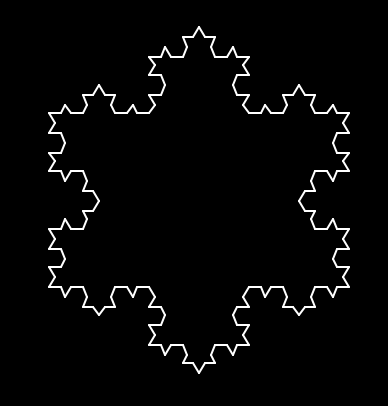
Fractals are a well-known math concept that can be utilized. Snow is not a perfect fractal, but we can simulate the look of snow using the algorithm from the Swedish Mathematician Helge von Koch. This is called Koch’s Snowflake4. The fractal sounds simple enough on the surface. A triangle gets split along each leg with more triangles that are also split in the same manner. This can keep on going further and further into detail for infinity. I encourage everyone to explore this more.
There are many implementations of this algorithm but I’ll take my own try on it. If you review the code, I took the approach of using a recursive function. That means, the algorithm iterates upon itself so triangles build upon the legs of base triangles. At each level called, a new part of the fractal is built. This is done 3 times, 1 for each leg of the base triangle. Then, the recursion will take care of itself down the line. The results are as follows:
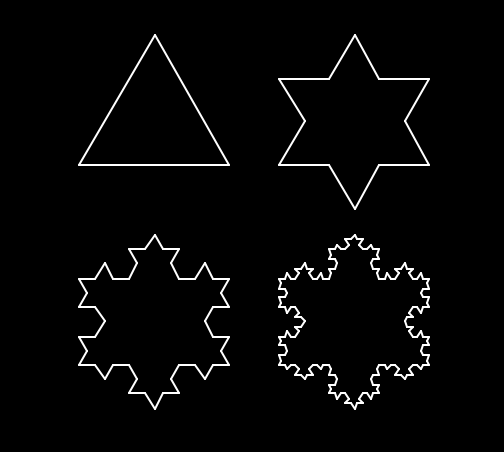
They really look great!
Look at that snowflake at the early levels. That looks a bit like a star on a Christmas Tree! That should be the next part of the card! How can a tree be made using some math?
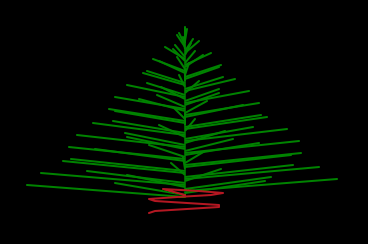
Think about the way a Christmas Tree looks. There is a point at the top that goes in a growing shape to the base. Along the way, there are many branches, stems, and needles that have a type of familiar pattern to it. I tend to see this a repeating form, such as a sinusoid. That seems like a good formula to try.
Sine waves are repeating functions. They go from -1 to 1 as time goes on so it’s contained and gives a uniform shape. That is not a tree shape in standard form. I feel that a good amplification factor will be needed! How about a simple approach that every time a new branch is formed, the value will be multiplied by a factor. I certainly had fun experimenting with different functions and values for factors. I decided on using the increasing branch number as the factor.
Before plotting, we cannot forget the trunk of the tree! In keeping with the theme of simplicity, I’ll use a sine wave with a width of 1/4 the branch length. This should provide a nice variation if we create more than one tree for the card. Here are the results:
Wait, what about the star on top? I’ll add one now! I’ll call the Koch Function but keep it at lower level. Let’s take a look:
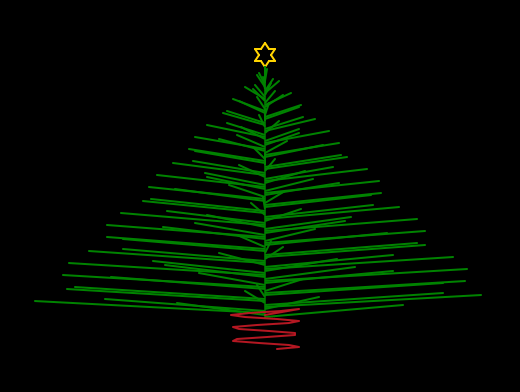
That is a pretty nice looking tree for a sine wave and a fractal!
That should do well for creating a couple of classic parts in the scene. Now, it’s critical to recognize the mystical aspect to Christmas. There needs to be an angel!
The angel announces Christ’s Birth to the shepherds in the field5. This is essential but how to do that with some math? There are some variations to discover but here is mine.
The body looks like a cone, so that’s a topological element. The head is a simple circle. The wings are arcs. It’s easy to draw all of this in Turtle but what about that halo? An ellipse seems the best but there is no built in function in Turtle. We need an algorithm!
Looking at the definition of an ellipse6, there are some simple approaches that can be taken. I did find some great implementations out on the giant, disorganized library known as the Internet. I took one that seems good7 and decided to have some fun with it. After trial and error, I feel the halo ellipse looks really good.
Here is the Angel:
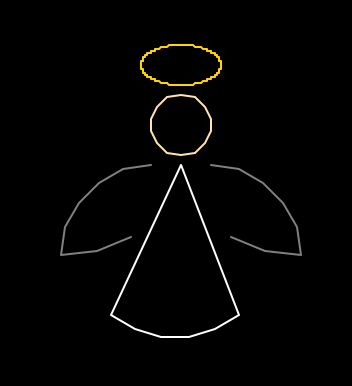
That looks like a good angel if I ever saw one!
To round it all out, it’s time for the actual greeting text. Fortunately, there is a very easy way to do this with Turtle. The hardest part is finding the actual font to make it look a bit more than ordinary8.
I think the end result is good:
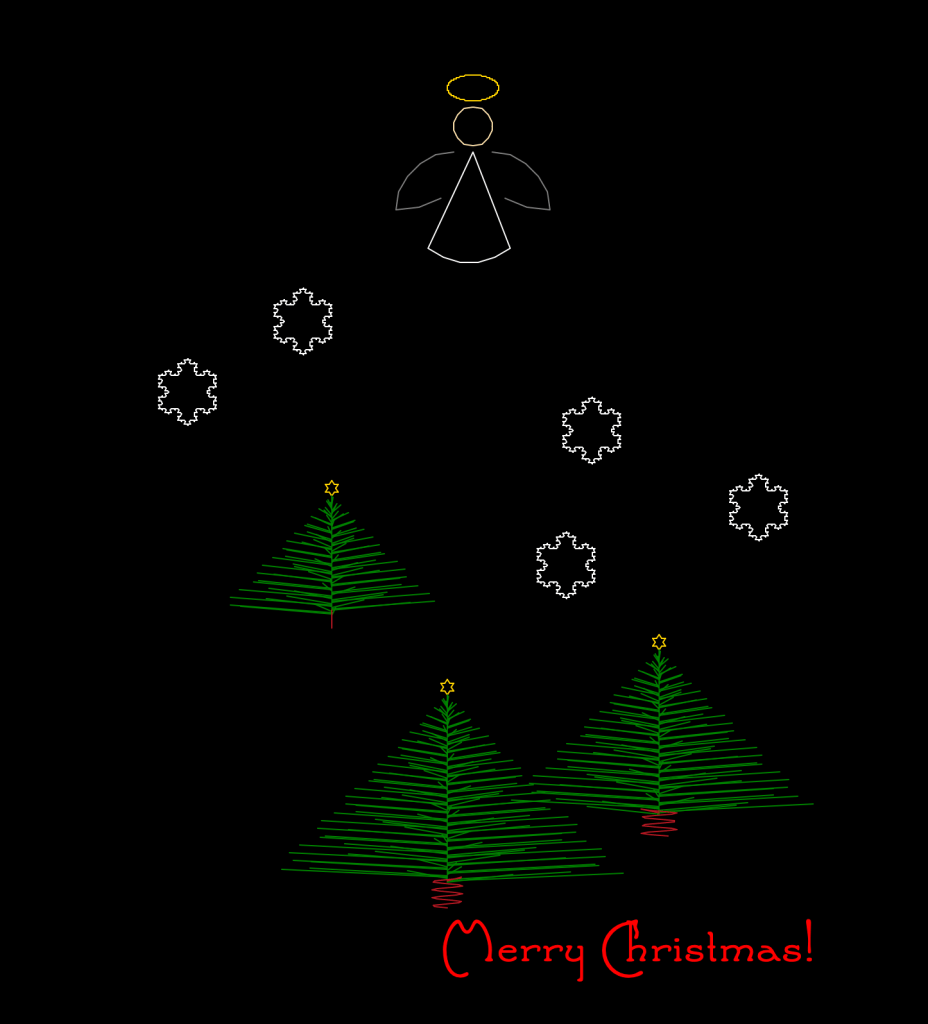
This has been a fun way to build a Christmas Card even without AI. There are many ways to do this type of artwork using math. I hope you take the code below and explore with it on your own.
May you and your loved ones have a Very Merry and Blessed Christmas!
Appendix
Code
For the code in this article, I started off using Object-Oriented Programming Techniques. It had a nice, elegant feel to it. It also began to become overly complicated. That started to bother me as I reviewed the code (and I am my worst critic). I knew something had to be done to simplify.
I have become a fan of using more direct coding techniques such as what is found in functional programming. This inspired me to take a step back and simplify the approach.
After a walk to contemplate what the purpose was for the code, I decide to redo it. Maybe the effort was not essential for this article. Then again, it’s important to stay true to your purpose. We can all take our code personally and that can be dangerous if taken too far. Still, we must realize the need to grow with our craft and never let our talent stagnate. This enables us to go from an apprentice to a master.
*Note: I used random numbers for placement of the different elements in the Christmas Card. Ah! Another use of random numbers!
# Date: Sunday, December 17, 2023
# Author: Andrew Della Vecchia
# Title: A Merry Christmas Wish by Visualization with Turtle Math.
# Purpose: Use creative math visualizaitons to generate a Christmas Card. Published on Andrew's Folly blog (andrewsfolly.com)
# Disclaimer: This code is given in an AS-IS condition.

# packages
import math
import turtle as t
import random as rnd

# Koch's Snowflake Fractal
def Koch(depth, level, outward_direction, x1, y1, x2, y2):

    if level == depth:
        draw_x1 = x1
        draw_y1 = y1
        draw_x2 = x2
        draw_y2 = y2
        t.penup()
        t.setpos(draw_x1, draw_y1)
        t.pendown()
        t.goto(draw_x2, draw_y2)

    else:

        sine_value = sin60 * outward_direction

        dx = (x2 - x1) / 3
        dy = (y2 - y1) / 3
        xa = x1 + dx
        ya = y1 + dy
        xb = x2 - dx
        yb = y2 - dy
        xc = xa + dx * cos60 - dy * sine_value
        yc = ya + dy * cos60 + dx * sine_value

        # split into 4 parts according to algorithm
        Koch(depth + 1, level, outward_direction, x1, y1, xa, ya)
        Koch(depth + 1, level, outward_direction, xa, ya, xc, yc)
        Koch(depth + 1, level, outward_direction, xc, yc, xb, yb)
        Koch(depth + 1, level, outward_direction, xb, yb, x2, y2)

# draw a full snowflake
def draw_snowflake(start_x, start_y, width, offset, level, color):
    t.color(color)
    begin_x1 = start_x
    begin_y1 = start_y
    begin_x2 = start_x + width
    begin_y2 = start_y + offset
    leg_len = math.dist((begin_x1, begin_y1),(begin_x2, begin_y2)) #math.sqrt((begin_x1 - begin_x2)**2 + (begin_y1 - begin_y2)**2)
    recursive_level = level

    Koch(0, recursive_level, -1, begin_x1, begin_y1, begin_x2, begin_y2) # leg 1
    Koch(0, recursive_level, 1, begin_x1, begin_y1, begin_x1 + abs(leg_len * cos60), begin_y1 + abs(leg_len * sin60)) # leg 2 - offset by 60 degrees
    #Koch(0, recursive_level, 1, begin_x1, begin_y1, begin_x2 + leg_len * cos60, begin_y2 + leg_len * sin60) # leg 2 - offset
    Koch(0, recursive_level, 1, begin_x1 + leg_len * cos60, begin_y1 + leg_len * sin60, begin_x2, begin_y2) # leg 3 - offset 60 degrees to other direction

# draw a Christmas Tree
def draw_tree(tree_start_x, tree_start_y):

    # init
    branch_count = rnd.randrange(80, 150)

    # use the snowflake alogirthm for a star but at a higher level
    draw_snowflake(tree_start_x - 5, tree_start_y + 5, 10, 0, 1, 'gold')

    # draw the tree branches
    t.color('green')

    # generate the branches using a sine equation that builds off of previous values
    # this is where someone will want to experiment to get various looks
    for branch_number in range(1, branch_count):
        branch_x1 = tree_start_x
        branch_x2 = tree_start_x + int(branch_number * math.sin(branch_number)) # You can experiment here with many types of functions such as math.log(branch_number/10))
        branch_y1 = tree_start_y - branch_number - 3
        branch_y2 = tree_start_y - branch_number + 3

        # draw but keep it clean
        t.penup()
        t.setpos(branch_x1, branch_y1)
        t.pendown()
        t.goto(branch_x2, branch_y2)

    # don't forget to draw the tree trunk
    t.color('brown')
    t.penup()
    t.goto(tree_start_x, branch_y2 - 5)
    t.pendown()

    # these can be changed to make the trunk thicker, thinner, taller, or shorter
    trunk_thickness = int(abs(branch_x2 - branch_x1) / 4)
    trunk_size = int(abs(tree_start_y - branch_y2) / 5)

    # experiment here to see what neat drawings can be built
    for trunk_level_number in range(branch_y2 - 2, branch_y2 - trunk_size, -1):

        trunk_x = tree_start_x - math.sin(trunk_level_number) * trunk_thickness
        trunk_y = trunk_level_number
        t.goto(trunk_x, trunk_y)

    t.penup()


# this draws an ellipse and is based off of code found here: https://trinket.io/python/8875abe323
def draw_ellipse(ellipse_start_x, ellipse_start_y, ellipse_width, ellipse_height, tilt_factor):

    t.penup()
    t.goto(ellipse_start_x, ellipse_start_y)
    t.pendown()

    # go around all degrees
    for i in range(361):
        theta = i * (math.pi / 180)
        x = ellipse_width * math.sin(theta)
        y = ellipse_height * math.cos(theta) - ellipse_height
        tilt = tilt_factor * (math.pi / 180)
        x1 = x * math.cos(tilt) + y * math.sin(tilt) + ellipse_start_x
        y1 = x*math.sin(tilt) - y*math.cos(tilt) + ellipse_start_y
        t.goto(x1,y1)

def draw_angel(x, y):

    t.hideturtle()
    t.speed(0)
    t.bgcolor('black')
    t.color('gold')
    t.colormode(255)

    # halo
    draw_ellipse(x + 20, y + 50, 10, 20, 90)

    # circle head
    t.penup()
    t.goto(x, y + 5)
    t.pendown()
    t.color(255, 229, 180)
    t.circle(15)

    # cone body
    t.penup()
    t.goto(x, y) # starting position
    t.pendown()
    t.color('white')
    t.goto(x - 35, y - 75) # draw left half of body
    t.setheading(320)
    t.circle(50, 80) # draw torso
    t.goto(x, y) # finish body

    # shapely wings using semicircles
    t.penup()
    t.goto (x - 15, y)
    t.setheading(180)
    t.pendown()
    t.color('gray')
    t.circle(45, 90) # left wing
    t.setheading(0)
    t.circle(70, 30)
    t.penup()
    t.goto(x + 15, y)
    t.pendown()
    t.setheading(0)
    t.circle(-45, 90) # right wing
    t.setheading(180)
    t.circle(-70, 30)


# init
# these values can get toyed around with to create various effects
cos60 = math.cos(math.pi/3)
sin60 = math.sin(math.pi/3)

# init the screen properties for use throughout the artwork
screen_width, screen_height = t.screensize()
t.bgcolor('black')
t.hideturtle()
t.speed(0)

# Draw some snowflakes
for snowflake_count in range(1, rnd.randrange(2, 5)):
    draw_snowflake(rnd.randrange(-screen_width / 2 , screen_width / 2 ),
                   rnd.randrange(-screen_height / 2, screen_height /2 ),
                   rnd.randrange(10,50),
                   0,
                   rnd.randrange(2,4),
                   'white')

# Draw a bunch of Christmas Trees
for tree_count in range(1, rnd.randrange(2, 10)):
    draw_tree(rnd.randrange(-screen_width / 2 , screen_width / 2 ) , rnd.randrange(-screen_height / 2, screen_height /2 ))

# draw angel high up and in the center
draw_angel(0, 300)

# Merry Chritmas Greeting Text
t.penup()
t.goto(-25, -350)
t.pendown()
t.color('red')
t.write('Merry Christmas!', move=False, font=('Santa\'sSleighFull',48,'normal'))

t.done()
References
[1] God. Christmas. United States Conference of Catholic Bishops. Retrieved from: https://www.usccb.org/prayer-worship/liturgical-year/christmas
[2] Python Software Foundation. Turtle Graphics. Retrieved from: https://docs.python.org/3/library/turtle.html#
[3] National Oceanic and Atmospheric Administration. How do snowflakes form? Get the science behind snow. December 21, 2022. Retrieved from: https://www.noaa.gov/stories/how-do-snowflakes-form-science-behind-snow
[4] Weisstein, Eric W. “Koch Snowflake.” From MathWorld–A Wolfram Web Resource. Retrieved from: https://mathworld.wolfram.com/KochSnowflake.html
[5] Luke. Chapter 2: The Birth of Jesus; The Visit of the Shepherds. United States Conference of Catholic Bishops. 2023. Retrieved from: https://bible.usccb.org/bible/luke/2
[6] Weisstein, Eric W. “Ellipse.” From MathWorld–A Wolfram Web Resource. https://mathworld.wolfram.com/Ellipse.html
[7] Trinket. Turtle draw Ellipse Function. Retrieved from: https://trinket.io/python/8875abe323
[8] Hypo Typo. Santa’s Sleigh Font. FontSpace. December 15, 2008. Retrieved from: https://www.fontspace.com/santas-sleigh-font-f6708
 Andy’s Neural Works
You must be logged in to post a comment.