Preface
The world of programming is a constantly changing one. Sometimes, it feels impossible to keep up with changes even focusing on a single language. This can overwhelm even the most energetic developer.
In recent times, the efforts in making low code and no-code reality are becoming fruitful. They are finding their way into the world.
Take the world of data engineering as an example. Keeping data processing together is a daily struggle. The last thing someone wants to do is debug custom coded data loads with hundreds of lines of code at 2am from an abend1. This is where a solid ETL tool like Informatica or SQL Server Integration Services come in handy. Instead of lines of SQL and C shell scripts, you have visual blueprints that build data flows. These tools can be costly but low code is a great benefit.
No code solutions are less available and are less flexible. They are growing in use, though. I feel this area has a lot of potential. It can be cultivated to handle the many facets of programming and that is difficult to do. Time will tell if it becomes successful.
For this article, I will be using Apple Shortcuts2. This is a low-code solution approach. It is available on most Apple platforms. Using the iCloud based ecosystem, it can be nice to start work on a Mac then sit back on a couch and continue the work. I always enjoy finding a fun reason for using my iPad while on a recliner.
Introduction
All good software needs to start with a basic idea to satisfy a need. Bringing that idea to fruition can be a long process. Without proper forethought, anyone working on the project can get lost. Having a good blueprint often helps keep the team focused. This is in the form of requirements and design documentation.
These documents act like a map to guide one to a destination. They should be constructed by someone with good experience. Further, they need to be carried out by someone with even more experience.
Almost everyone in software engineering agrees that requirements are necessary. The conversation gets more heated when it comes to creating system design documentation. There are those that say it creates unnecessary overhead and maintenance. I believe this harks back to the argument of waterfall vs agile methodologies.
For the uninitiated, waterfall methodology states that you must layout every piece of requirements before going to design. Then you build out every piece of the design before going to development. This seems logical. In practice, you can get into a situation when roadblocks are hit in development. There might be unforeseen issues in the design that cannot be developed. At that point, development gets halted and the design gets reworked. The same can be said with all phases in waterfall. As an example, you find out that you misinterpreted a requirement when user acceptance testing is conducted. This requires going all the way back to the beginning.

As you see, waterfall methodology can have issues. This led to a need for more quick build or just-in-time approaches, such as Rapid Application Development3. Unfortunately, misinterpretation of these processes led to poorly written applications that were originally prototypes or a proof of concept. Where software development became more edgy, it also lost quality.
Volumes are written to describe more agile concepts but now we have even more paradigm shifts happening. Recently, there is the growth of low code and no code development. These techniques are meant to cut out the mostly costly aspect of software, the developer’s time. It is also possible to use these techniques to bring development to the non-technical person.
Increasing productivity can be good as long as it is done with quality that’s beyond “good enough.” An example is seen every day with the overuse of Excel for production data systems. A simple concept is built quickly by a business owner to get data they need. Over time, more macros and worksheets are easily added but it never goes through the software development lifecycle. It is never reviewed and testing is often done only after errors are found. This is a critical failing point.
What then to do when you need quick resolution of a gap but don’t have resources for a full development effort? Here is where I believe design needs to come into play. Let’s create a project for something I need using a low-code approach.
Every journey starts with a single step
The first step is always to ask what the need is that requires the effort. As a personal hobby, I like to do a research on various topics that interest me and that require data. Those data can come from a lot of places, including web sites. So, the goal of this project is web scrapping for research purposes.
I will now add requirements. They are:
- Use low-code techniques
- Drive the web scrapping off of a series of Uniform Resource Locators (URLs) in a file I can edit.
- Get a process that pulls out URLs from a website
- Follow the web scrapping etiquette rules (ie. robots.txt is respected and further)4
- Extract data and put into a basic text file.
- Enable future expansion to use parsing.
- Possibly be able to run on iPad. This platform is excellent for portability but has limits for development.
This practice is already known as web scrapping. The effort sounds simple enough but is it really?
Determine Feasibility
Never forget to do a proof of concept while laying out a design. Throughout my career, I have seen many fantastic solutions dreamt out to solve the problems of the enterprise. Budgets get created without understanding the technology chosen. As a result of this ignorance, the project fails during implementation. Worse, some form of forcing a fit takes place. That is certainly a recipe for failure.
Thankfully, for web scrapping, it is a proven technology. There are different libraries in various languages, such as Beautiful Soup5, that can accomplish it. A simple experiment proves it possible but remember one critical element. I want to focus on low-code and this is not that solution. What exists in this realm that meets that requirement?
I did some research looking for such a tool. Fortunately, we have one available and it’s even on the iPad. A low-code tool is available from Apple. It is called Shortcuts and focuses on automation. There are several components that suggest it can read a web site and pull the information into a text file. That sounds great!
It was not difficult at all to prove it works. A few components are added to a shortcut sequence and I have a web page scrapped. I’ll take that as a good concept win for low-code and move on to more meaty steps.
Breaking out functional points
Approaching an actual design can be daunting. It can be dangerous if decide to dive into the lowest level on first pass. You need to think in terms of layers. Start out at the surface level and get a basic system flow. Think simply and clearly about what is needed. Here, it is a mere 5 steps:
Level 1 – High Level System Flow
Steps
- User determines URL of interest
- User reviews robots.txt to determine the areas of the site that are accepted for scrape.
- System reads target web page to capture all URLs into a file
- User reviews and edits URL listing
- System reads URL listing and scrapes web pages to text files
This is simplistic but lets note some conditions:
Pre-conditions: Base URL
Post-conditions: Extracted text files
Side-effects: None
That gives a nice view of the process that also includes the user. A system level diagram is nice at this point.
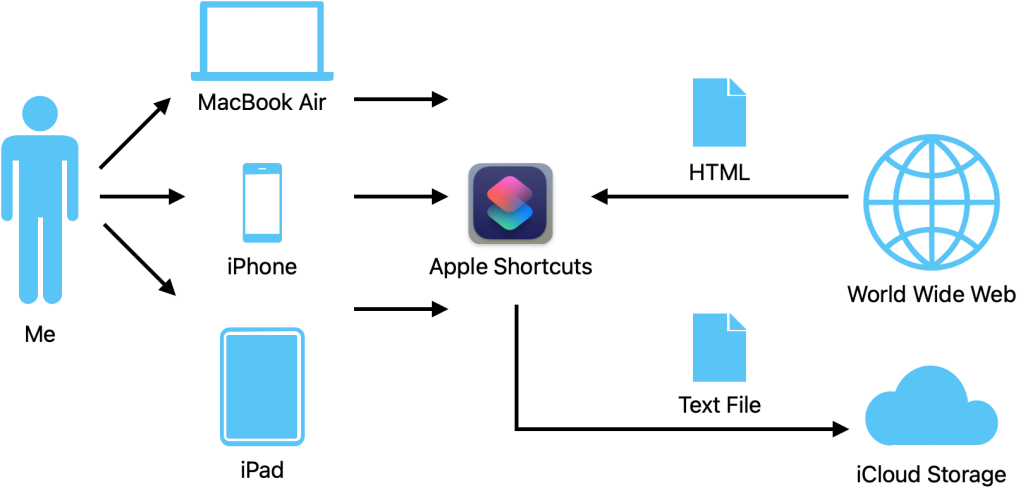
The next step is to add more detail to the system to be built. This will be the component level.
Level 2 – System Components
Component Name: URL Reader
Description: This component creates a file containing the urls from the source website.
Steps:
- Ask User for Website
- Read Website
- Extract URLs
- Remove duplicates
- Write to extracted URLs file
- Notify User of Completion
Pre-conditions: Base URL
Post-conditions: extracted URLs file
Side-effects: None
Component Name: Web Scraper
Description: This component is responsible for pull Hypertext Markup Language (HTML) pages from URL list and processing to text file.
- Read extracted URLs file
- Iterate through list of URLs
- Read web page
- Convert to text file
- Write text file to file system
- Repeat process for each URL
- Notify user of completion
Pre-conditions: extract URLs file
Post-conditions: web sites extracted to local file system in text format. User notified process completed
Side-effects: None
As before, a diagram never hurts.

How about a level 3? Is that really needed, though? If it were to go further, now we are getting detailed to the physical implementation. That’s starting to feel like old-school waterfall.
If this were not a personal project, I might require more detail. The extra level would relay the physical pieces need for the web scraper component. That component is chosen because I have a requirement to enable expansion for parsing. For this to be implemented properly, the web scraper needs to be flexible. A driver/iterator approach fills this need well. The sequence would be as follows:
Name: Web Scraper – Iterator
Description: This is the driving mechanism that reads through requested URLs and processes to text files.
- Read the extracted URLs
- Iterate through URLs
- Call the Extraction Process
- (Future) call the Parsing Process
- Notify User Process completes
And the other physical functions would be:
Web Scraper – Extract
Web Scraper – Parser
Possibly more!
I feel that more levels than 2 would not be needed for low-code. However, that decision is based on the needs of the project after review of the entire environment. Still, I will define the file definition of the extracted URLs file. This comma-delimited layout will make it easy for me to read and manage the URL listing:
Field 1 – ID
Format: Integer
Description: Simple sequential ID used to identify order of URL from source site.
Field 2 – Name
Format: String
Description: The description value associated to URL pulled form the source site.
Field 3 – URL
Format: Strong
Description: The URL pulled from the source site.
Why?
This is not much work to do but again, why is design needed? Why not just rely on requirements alone? That is often quoted in agile approaches. The requirements are the design. I disagree with avoiding design.
My response comes from the book of Proverbs 19:2:
“Desire without knowledge is not good; and whoever acts hastily, blunders.”
Software engineers take note of this lesson to think before you leap. Never be in such a rush to get work done that you lose your brain. It will only work against you in the end.
If this system is built purely on requirements, there are many paths it could take from a simple line or two of text. Focusing more on practical application provides more of a direction for development. There is also the effect on other areas of the team. Did you forget about the QA Analysts? They need well defined information to write their test scripts. Remember, quality is essential for success. The initial view of buggy software is hard to correct vs one that works as expected from the start!
Parallel Work
The benefit of low-code solutions is simplistic development. Like other efforts, this does not have to be done in a waterfall approach. As the design is being built, development can happen at fulfillment points. If a self-contained area can be identified, developers can begin. QA can also start writing their test scripts (remember to always bring QA in the loop during requirements). This type of parallel efforts will add flexibility and efficiency.
If management is well experienced, you will certainly see requirements being built early enough in this fashion. These will then be released for design and development to take over. This type of agile approach is often skipped and you end up with waterfall that has a loop.
Find Your Own Pattern
What I discussed here focused on low-code. This is going to become more used everywhere. Do not let the simplicity fool you. A design methodolgy is still necessary. Many approaches from decades of efforts exist to learn from. What works is up to you and your team.
Following a basic lifecycle helped with my efforts for this project. I put the final components in the appendix. Not only does it work but I have used it several times already. As a bonus, it does work just fine from the iPad. I might even try it out on my iPhone since Shortcuts exist there too.
Software engineering will always need process. Remember the goal the whole time. Never forget this is about fulfilling a need. Never let process overwhelm the efforts. Finding what works comes with experience. That can come from failure or success. They are both ways to learn.
Thank you and have a great day!
Appendix
URL Reader Shortcut

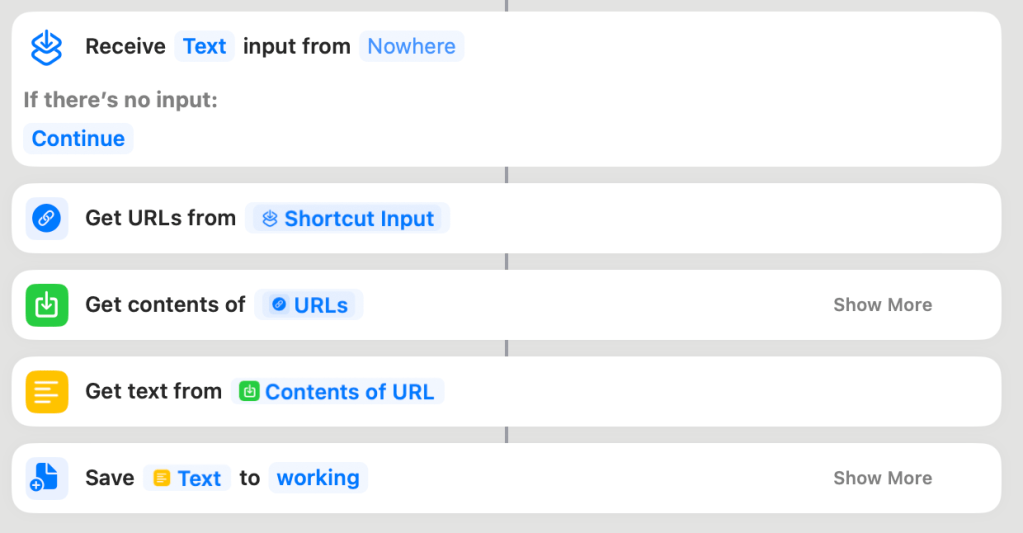
Web Scraper Iterator Shortcut

Scrape Web Page Shortcut
References
[1] PCMag. abend. Retrieved from: https://www.pcmag.com/encyclopedia/term/abend
[2] Apple. Shortcuts. Retrieved from: https://support.apple.com/guide/shortcuts/welcome/ios
[3] GeeksForGeeks. Rapid application development model (RAD) – Software Engineering. Retrieved from: https://www.geeksforgeeks.org/software-engineering-rapid-application-development-model-rad/
[4] Webbiquity Blog. The Etiquette of Web Scraping and How to Use Web Scraping Legally. Retrieved from: https://webbiquity.com/marketing-technology/the-etiquette-of-web-scraping-and-how-to-use-web-scraping-legally/
[5] Leonard Richardson. Beautiful Soup. Retrieved from: https://beautiful-soup-4.readthedocs.io/en/latest/
 Andy’s Neural Works
2 responses to “Designing for a Low-Code Web Scraping Process Using Apple Shortcuts”
[…] URLs for all sources. Fortunately, I already have a process that pulls URLs and related text. This has been previously discussed. Given that the Bible is a collection of books does increase complexity. This requires minor […]
LikeLike
[…] a more extensive project, the page would be scraped. This approach has been talked about in a previous article. That is overkill in this example. Keep in mind how easy it is to manually copy and paste text when […]
LikeLike