Introduction
Building data structures is a fun endeavor. It can come naturally to an organized person. Even unstructured and semi-structured data get organized in a way. Otherwise, retrieval would be incredibly challenging.
Up until this point, the focus on this dungeon crawler game has been on data related elements and rules. In this step, we’ll get into the user experience. It’s time to talk about the User Interface (UI). I hope this is a bit of fun for you.
In my experience, the UI is an art form unto itself. Certain UI standards for look and feel come and go. Some take a very minimalistic approach while others try to add in as much as possible. For what is happening with this game, our approach will be more minimalistic. That’s not to say that future versions won’t gain more pizzazz but I believe in taking a cautious approach for the initial UI.
Goals
Let’s go through the steps to define the various components. We will need to define the audience and environment, as well as what is needed for display. These steps are common to the design process. A mockup of the UI is also needed. Let’s keep an open mind with this UI.
At the end of this exercise, we will have a working prototype. This will be used to test out the look and feel of the title. I will have it available for view on a server. That way you can test it out and provide some feedback if you so desire.
Iteration is used in the prototype phase. If feedback received is useful, the prototype is updated with the change. Again, there is an art form to UI design. Not everyone likes the end product (example: Apple’s Liquid Glass1). Hopefully, the result makes most people content.
Audience
The audience defines who is going to interact with the UI. Who is going to be our target for this process? This is important to keep well defined. If we were to make an interface intended for players but show only system administration functions, we’ll miss the mark. In this case, we are designing an interface for the gamer. Anything having to do with underlying supporting functionality will not be considered.
Localization is a question for having worldwide reach. As of this date, I am the only person working on this project. As I am monolingual, I will be keeping everything in English. Apologies to those who do not understand English. In future iterations, I could possibly use a translation agent to convert to various languages. That could led to translation errors, though (example: “A Winner is You”2).
Environment
The environment will list all of the supporting objects and components. This is how the interface will be built and delivered. There are many ways to do this. We could consider it as a mobile app or maybe even more specific (a phone vs a table, for example).
I want this game to be playable worldwide. It needs to be as platform independent as possible. The approach I decided to take is to use frameworks and tools that can be accessed via a web browser.
Now, there are many opportunities for many toolkits to build the interface. However, I need these to be readily available in a Python environment since that is what I decided to use as the development language. Fortunately, there are frameworks and libraries such as Streamlit, Django, Dash, and Shiny. There are more, but I am going with Shiny3.
I have been a fan of Shiny since using it with R in various analytics projects. It might sound odd to use an analytics kit. In practice, it is very easy to use and has reactive components to it. That means the UI can be updated dynamically. The underlying messaging between widgets is handled without complex coding.
I would also like to have an existing host environment so people can play with the prototype. I could build a server myself, but will simply pick one that is already existing. Fortunately, the company that makes Shiny, Posit, has hosting capabilities and scale to the use. If this ever becomes more popular than expected, I can upgrade the hosting to handle more players. This seems like an easy decision to make.
Display
With every UI, there needs to be a functional definition of what to display as well as one that relates data. Games can be different, though. In some cases, not showing every bit of data element leaves the player “feeling” their way through some things.
In this title, we’ll stick with showing the statistics more. We will also relay the individual functional points.
Data Points to Display
The data points of the screen will reflect the elements of the player. Going back to the requirements, we have:
- Hit points
- Score
- Name
- Inventory
- Strength
- Dexterity
- Wisdom
- Status
There is also the story itself that needs a UI element to be built. As an action takes place, the story text will be appended with what happened to the player.
Reactivity
Data need to be reactive to the game. That means, the values change as they get updated. If a score goes up, the UI needs to reflect that change as soon as it is done. This is required of all the data elements in the display.
Functional Points to Display
Functions are what the player interacts with in the game. Specifically, the following functional points are needed:
- Sword Attack
- Bow Attack
- Magic Attack
- Heal
- Run away
I see these as simply buttons on the screen. You click with a mouse (or touch if using a tablet or mobile device).
Mock it up
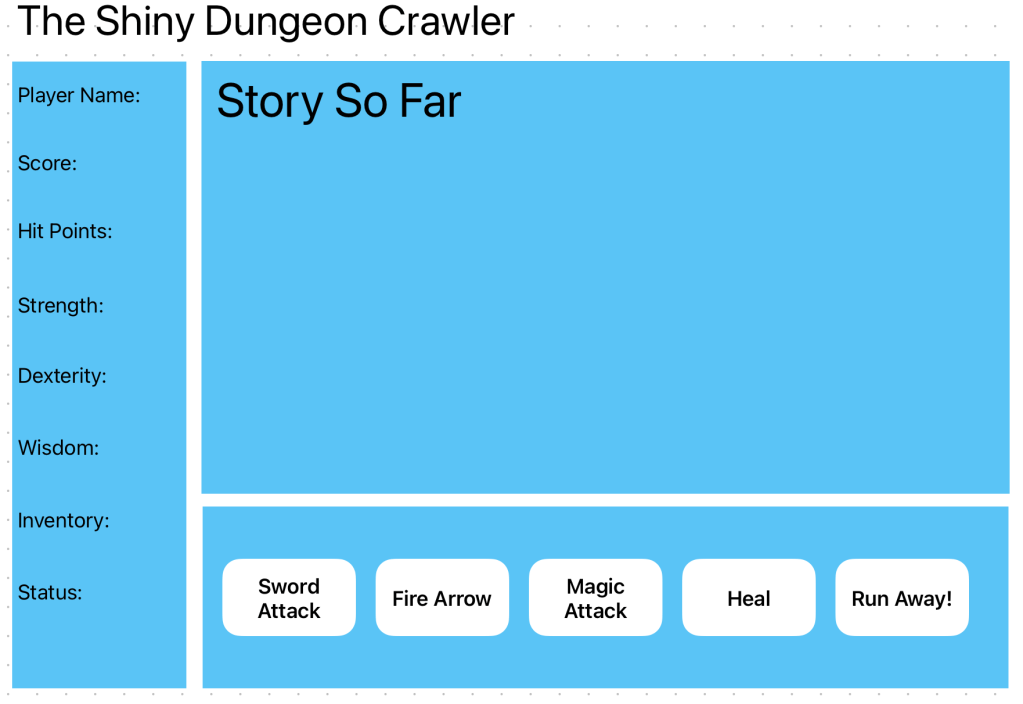
Let’s put these together in a simple mock-up. If there were multiple screens, these would be wired together and the entire schema would be called “wireframes.”
For an initial view, I went with a division of 3 areas:
- Player Data
- Story Text
- Action Bar
This will keep an organization to the components. Actions are organized together while data elements are grouped. The story itself takes center stage.
Here is the resulting mock-up:
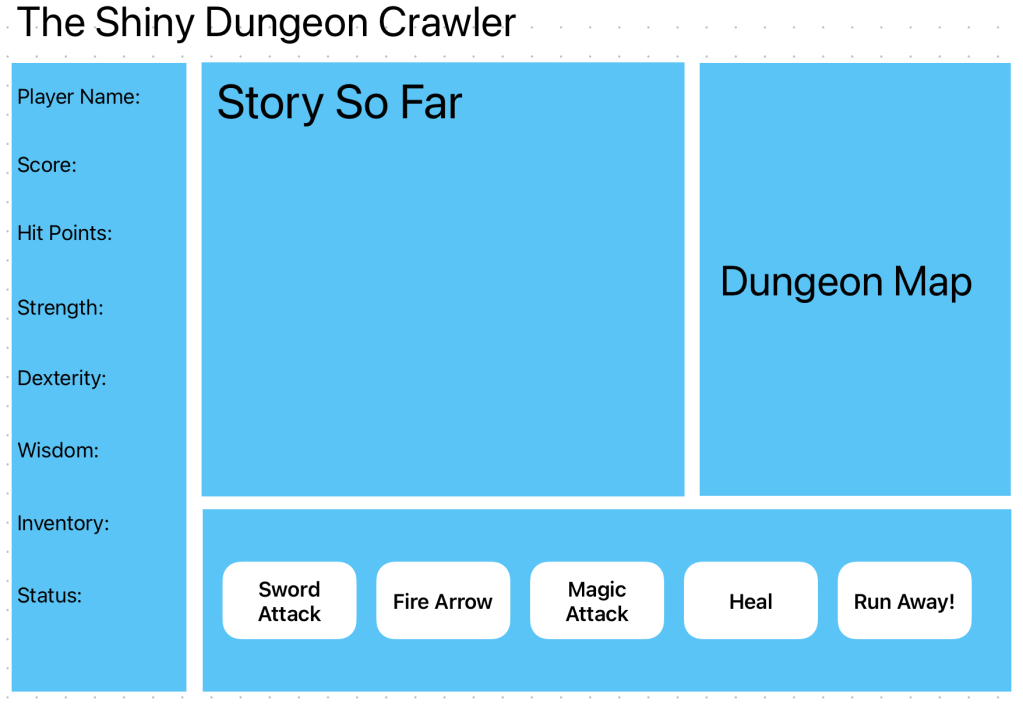
What I like about this approach is that it is open to expansion. For example, if you read an older article on creating a game dungeon map, you will see a network diagram. This could be added to create another dimension to play:
Let’s get to building the prototype so there is something to play around with. This will be fun.
Developing the Prototype
Developing the prototype is fairly straightforward with Shiny. It is a matter of creating a file named “app.py” and adding in the UI widgets as code. An example of this follows:
app_ui = ui.page_sidebar( ui.sidebar( ui.card( ui.card_header("Name"), ui.output_text("name"), full_screen=False ),What that app_ui variable does is to contain the elements for the UI. In this snippet, the sidebar along the left side of the UI. That will hold the data elements. You can see there is a card with a text box also added for the player name. This approach is repeated for every widget as part of the screen.
Keep the following in mind:
ui.card(ui.card_header("Actions"), ui.layout_columns( ui.input_action_button("sword", "Sword Attack"), ui.input_action_button("bow", "Fire Arrow"), ui.input_action_button("magic", "Magic Attack"), ui.input_action_button("heal", "Heal"), ui.input_action_button("run", "Run Away!") )These are the buttons that will be used for the various player interactions. Now, let’s give the UI functionality. Look at the following function:
def server(input: Inputs, output: Outputs, session: Session):This is the function that contains the reactive events. In the following example, the sword button is defined as:
@reactive.event(input.sword) def sword_btn() -> None: add_to_story("You swing your mighty sword!")It simply is a function I created that builds the story text. The story will get updated with the text “You swing your mighty sword!” when the sword button is clicked. As the code develops, additional logic will be coded to handle the sword attack.
All of the defined events in the server function along with the UI elements are passed into an the important app variable:
app = App(app_ui, server)The framework requires this variable and approach. It interprets the various objects and builds the UI. Again, any type of underlying messaging is controlled by the Shiny server. If interested in details on what you can detail, refer to the examples on the Shiny site. You can also find the prototype I built here:
https://andys-neural-works-shiny-dungeon-crawler-prototype.share.connect.posit.cloud/
If you want to provide feedback, go to the contact page. I don’t always answer my email but I do read the messages.
Next steps
Now that there is a working prototype that can be viewed by anyone, it is important to gather feedback. If any reader is interested in doing so, please use the Contact Page to send a message to me. I have already taken informal opinions from family and friends. If any of that becomes a reasonable change, an iteration will be executed on the UI.
As the interface becomes solidified, I will add in the remaining python code. This will cover the actual working code to make the game itself. I will post the results in the next article. That will be enough for v1 of the game.
Thank you for reading!
References
[1] Apple. Apple introduces a delightful and elegant new software design. June 9, 2025. Retrieved from: https://www.apple.com/newsroom/2025/06/apple-introduces-a-delightful-and-elegant-new-software-design/
[2] Know Your Meme. A Winner is You. Retrieved from: https://knowyourmeme.com/memes/a-winner-is-you
[3] Posit. Shiny. 2026. Retrieved from: https://shiny.posit.co/
Code
All code in this article is provided in an AS-IS condition. Use at your own risk.
from shiny import App, reactive, render, ui, Inputs, Outputs, Sessionfrom htmltools import HTMLhero_story = reactive.value("It Begins")app_ui = ui.page_sidebar( ui.sidebar( ui.card( ui.card_header("Name"), ui.output_text("name"), full_screen=False ), ui.card( ui.card_header("Score"), ui.output_text("score"), full_screen=False ), ui.card( ui.card_header("Hit Points"), ui.output_text("hp"), full_screen=False ), ui.card( ui.card_header("Strength"), ui.output_text("strength"), full_screen=False ), ui.card( ui.card_header("Dexterity"), ui.output_text("dexterity"), full_screen=False ), ui.card( ui.card_header("Wisdom"), ui.output_text("wisdom"), full_screen=False ), ui.card( ui.card_header("Inventory"), ui.output_text("inventory", inline=False), full_screen=False ), ui.card( ui.card_header("Status"), ui.output_text("status"), full_screen=False ) ), ui.card(ui.card_header("Story So Far"), ui.output_ui("story"), full_screen=True, min_height=240, max_height=800), ui.card(ui.card_header("Actions"), ui.layout_columns( ui.input_action_button("sword", "Sword Attack"), ui.input_action_button("bow", "Fire Arrow"), ui.input_action_button("magic", "Magic Attack"), ui.input_action_button("heal", "Heal"), ui.input_action_button("run", "Run Away!") ) ) ,title="The Shiny Dungeon Crawler")def add_to_story(appended_text: str) -> None: global hero_story hero_story.set(hero_story.get() + "<br/>" + appended_text)# print(hero_story) return Nonedef server(input: Inputs, output: Outputs, session: Session): @reactive.effect @reactive.event(input.sword) def sword_btn() -> None: add_to_story("You swing your mighty sword!") return None @reactive.effect @reactive.event(input.bow) def bow_btn() -> None: add_to_story("You draw back on your bow, aim, and fire!") return None @reactive.effect @reactive.event(input.magic) def magic_btn() -> None: add_to_story("Magic Attack!") return None @reactive.effect @reactive.event(input.heal) def heal_btn() -> None: add_to_story("You clicked the heal button!") return None @reactive.effect @reactive.event(input.run) def run_btn() -> None: add_to_story("You clicked the run button!") return None @render.text def name() -> str: return "Sir Gallops A Lot" @render.text def score() -> int: return 0 @render.text def hp() -> int: return 20 @render.text def strength() -> int: return 17 @render.text def dexterity() -> int: return 7 @render.text def wisdom() -> int: return 12 @render.text def inventory() -> str: output_text = "1, 2, 3, 4" return output_text @render.text def status(): return HTML("You feel <b>great!</b>") @render.ui def story(): global hero_story# print(HTML(hero_story.get())) return HTML(hero_story.get())app = App(app_ui, server)requirements.txt
htmltools==0.6.0
shiny==1.5.0
shinychat==0.2.8
shinywidgets==0.5.2
 Andy’s Neural Works
You must be logged in to post a comment.