Introduction
Whenever a new stream of data comes onto the work scene, it is rarely in a form that is ready to be loaded into a final target table. It is often in the form of a report, where the set might be pivoted and summarized. There will be groaning but it is fine as long as it is an accurate representation of information. We have technology and are not afraid to use it!
The Large Report Problem
For this example, let’s say you have a good-sized file of genetic information. We can take an example from the Human Genome Diversity Project (you can find many fun sets of data here: Awesome Public Data). One of these files has over 1000 columns for genotype and over 660,000 rows for marker (the cross of the two is the strand). The rows are not terrible but over 1000 columns could prove interesting when trying to normalize the structure.
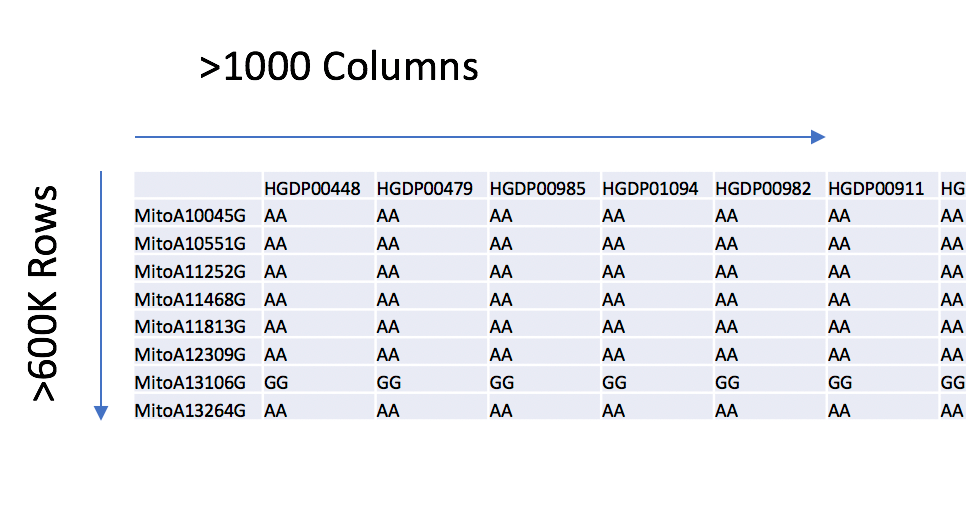
Can you imagine trying to write SQL on over 1000 columns? Let’s move forward with the goal of turning this into a 3-column set to contain genotype, marker, and strand. The number of rows goes up significantly, but it will be manageable overall.
The Existing Process in Our Head
The learning process to analyze and prepare the report can take a troubling journey sometimes. Maybe, we are afraid of getting out of that comfort zone of our favorite tools. In this case, the first step many analysts will take to ponder data is to reach for their favorite spreadsheet or text editing program. That is fine for small sets but what about the large variety that will bring down those programs?
Others could go for a programming language where it could take a long time to code and test. Still, some might load the set into a staging area of a data lake as is and call it a day letting the folks down the line handle it.
Now, if you are really fancy, you will reach for an ETL tool that has unpivot transformation capabilities. That works nicely as long as you have a proper hardware configuration and buy-in.
Try Something Different
Here, let’s take that philosophy of emptying one’s cup and try something different. Look to some of the tools that often are at your disposal that you may have heard tales of in IT lore. There are shell tools in Windows (PowerShell) as well as Unix based OS (bash, ksh, etc). There are even versions of shells that pollinate across OSes. They are very powerful, often written in efficient, low level languages, and capable of handling large file sizes without a sweat. So, let us dive into one and see what happens.
Give awk a chance
For this purpose, I am going to venture into awk. It has been around since the 1970s and has seen many iterations. It is still a viable tool that I recommend you put in your technology quiver. For a history of awk (named after the 3 developers at Bell Laboratories), you can go up to the Wikipedia page (AWK History) or do your own research. I also recommend reading the man pages to get a starting idea of how to use it. Then, take some time and see what others have done with it (many forum posts abound with useful information on awk).
The solution
OK, so I want to get an idea of what I am dealing with here. The first thing I will do is to take a look at the top 100 rows with the head tool:
head -n 100 HGDP_FinalReport_Forward.txt > HGDP_FinalReport_Forward.sample
This will create simple sample file to test our process (always have a test sample when dealing with bigger datasets).
What I am going to show you next is an awk script. Like most good developers/analysts, I will look at both code I have in my storage as well as on the Internet. Reuse is good but do not be afraid to experiment. Here is what I have put together from various sources (I saved this into a file named “andrew.awk”):
BEGIN { FS = “\t”; TableHeader = “genotype,marker,strand”; fmt = “%s,%s,%s\n”; }; {sub(/^M/,””)}; FNR == 1 { split ($0, fld, FS); print TableHeader; next; } { for (x = 2; x <= NF; x++) printf (fmt, fld[x], $1, $(x)); }
This may seem a bit arcane if you are not used to shell scripting. However, it is very powerful and can be broken down into parts. This section is a type of declaration section:
{ FS = “\t”; TableHeader = “genotype,marker,strand”; fmt = “%s,%s,%s\n”; };
This is saying that the current file delimiter is the tab character, will have a final table header of 3 fields (genotype, marker, and strand), and the output format will be in a comma-delimited format.
This next part is saying to remove the end of line control-M character:
sub(/^M/,””)};
Continuing forward:
FNR == 1 { split ($0, fld, FS); print TableHeader; next; }
Here, the logic will split each file identified (in this case, there is only 1) into a field array (named: fld) according to the delimiter (which was defined above as a tab). The table header defined above (genotype, marker, and strand) is printed out.
Finally, this section:
{ for (x = 2; x <= NF; x++) printf (fmt, fld[x], $1, $(x)); }
What this is doing is to iterate through the file, outputting the field array from above followed by the first column then the subsequent data.
Let’s now try it out on our sample:
awk -f andrew.awk HGDP_FinalReport_Forward.sample > HGDP_FinalReport_Forward.sample.out
awk is called to execute the script on the sample extracted above. It processes in the blink of an eye on the small sample and looking at the results (only the first 20 rows are shown here but the pattern continues for all expectations):
genotype,marker,strand
HGDP00448,MitoA10045G,AA
HGDP00479,MitoA10045G,AA
HGDP00985,MitoA10045G,AA
HGDP01094,MitoA10045G,AA
HGDP00982,MitoA10045G,AA
HGDP00911,MitoA10045G,AA
HGDP01202,MitoA10045G,AA
HGDP00927,MitoA10045G,AA
HGDP00461,MitoA10045G,AA
HGDP00451,MitoA10045G,AA
HGDP00986,MitoA10045G,AA
HGDP00449,MitoA10045G,AA
HGDP00983,MitoA10045G,AA
HGDP00912,MitoA10045G,AA
HGDP01283,MitoA10045G,AA
HGDP00928,MitoA10045G,AA
HGDP00937,MitoA10045G,AA
HGDP01408,MitoA10045G,AA
HGDP00991,MitoA10045G,AA
…
Success! The data are in a form that is more normalized. Now, let’s kick off the job on the full set:
awk -f andrew.awk HGDP_FinalReport_Forward.in > HGDP_FinalReport_Forward.out
Approximately 15 minutes to finish transforming the data. Take a look at the final line count:
wc -l HGDP_FinalReport_Forward.out
This results in the following number of lines:
689337475 HGDP_FinalReport_Forward.out
That is a pretty decent amount of data and matches what one would expect from the source. Breezing through these data (too large to include here), we see that we have the same format expected from our sample test.
For sanity sake
For a comparison of some other solutions, merely opening up the file with a mainstream spreadsheet program took about 10 minutes. Running macros took hours for processing. For a production system, we want this to run as quickly as possible.
With R, that same file was loaded into a df in about 2 minutes. That’s reasonable until you start doing some manipulation. R errored out when trying to melt the data (memory limit reached) so that is a failure. Maybe if there were a beefy R Server available, this would perform more in line with what is happening with awk?
Which raises the point of having a beefy server for anything. If the process is 15 minutes on my MBP, what would performance be like on a server? Obviously better, but can it get to <1 minute? If I ever get a server setup in my house, I will report back.
Conclusion
I think that there are very good results from this exercise. We can now feel comfort in that the table that will eventually contain this set will not have to have >1000 fields to maintain or to oddly query (*Note: This file is a good candidate for a bcp in process as it is a rather straightforward load now). It also proves that awk stands up to time and we should consider all options when that odd source file comes in for analysis. Hopefully, you will give it a shot, and other tools, in a future effort rather than reaching for a spreadsheet application. Experience, whether failure or success, is a good thing so have fun giving it a go.
Thank you
 Andy’s Neural Works
You must be logged in to post a comment.