In the world of ETL (Extract, Transform, and Load), there are many ways to get from point A to point B. The coding direction you take all depends on what you are trying to end on. Are you going for a data warehouse structure, a data lake, or a generalized system? You might be loading into all the various levels of normalized or denormalized structures. The universe is quite large.
To complicate matters, you often have a series of disparate data systems to provide your starting point. They can come from anywhere. A highly supported RDBMS is often in the mix, a NoSQL solution, a social feed, or even a spreadsheet off of a user’s desktop machine from eons ago that keeps moving along are just a hint of the possible data sources.
The usual ETL process
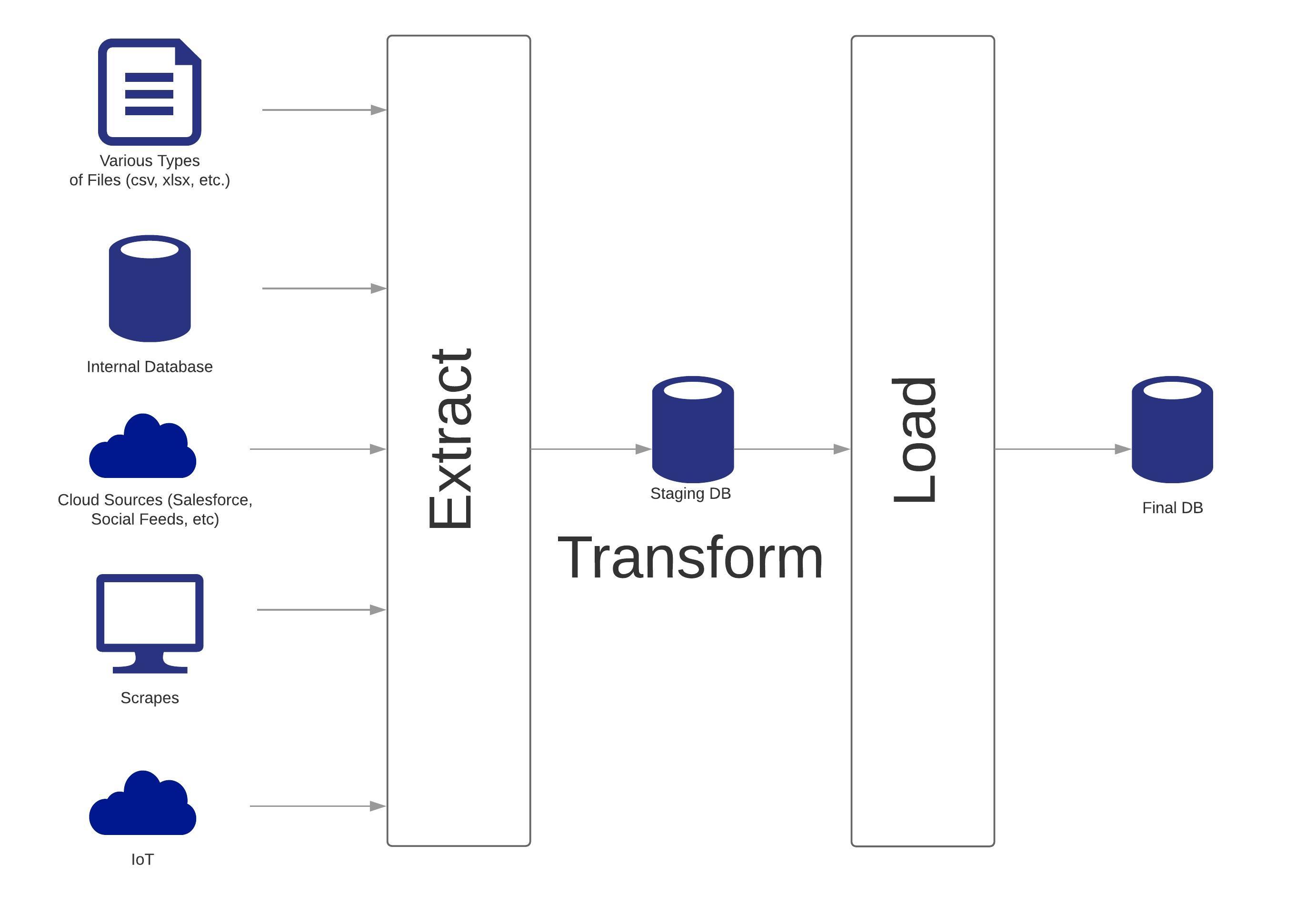
The more common ETL processes, seen at the high level, go like this:
- Find a way to extract from the source(s) into a format that can be brought into a staging area. Here is where you have to be as flexible and open as possible because everyone wears a different shoe size and style here.
- Once in staging, you manipulate, merge, sort, cleanse, and other forms of transformation magic to spin out gold data. If you are on the edge, you go with temporary storage, but most will opt for creating a physical level of staging that mimics the final load (when dealing with a SCD, this approach will help ease the complexity).
- The data is then loaded/ingested into the final structures. If you are using a partitioned approach and have created a mimic in staging, then you can just swap out the partition for speed.
This is pretty typical in your usual “scheduled” or “right time” ETL processes. Real-time ETL is a different project that is going to go beyond what I put forth here.
Addressing Issues
Now ask, what happens when you have a problem? It is very difficult to code for every possible scenario even with a tool. You should strive to code to handle errors so the ETL can full complete but sometimes, one of your components will throw an exception and the job “abends.” This is where you have to ask if there is a logging component in your process to tell you exactly what caused the issue? Can you say “here is the exact record or records where the process failed?” How about determining the phase of ETL you are in for a failure? Can you restart the process from where it stands, or do you have to clear out and re-execute only to have another failure? How are you maintaining process state?
One Possible Take
What I am showing should be taken as a base to build off of for your very own solution. I want you to make it your own as each project is like a math puzzle with countless different solutions. No one has all of the answers, but these common concepts should get your started.
The Control Table
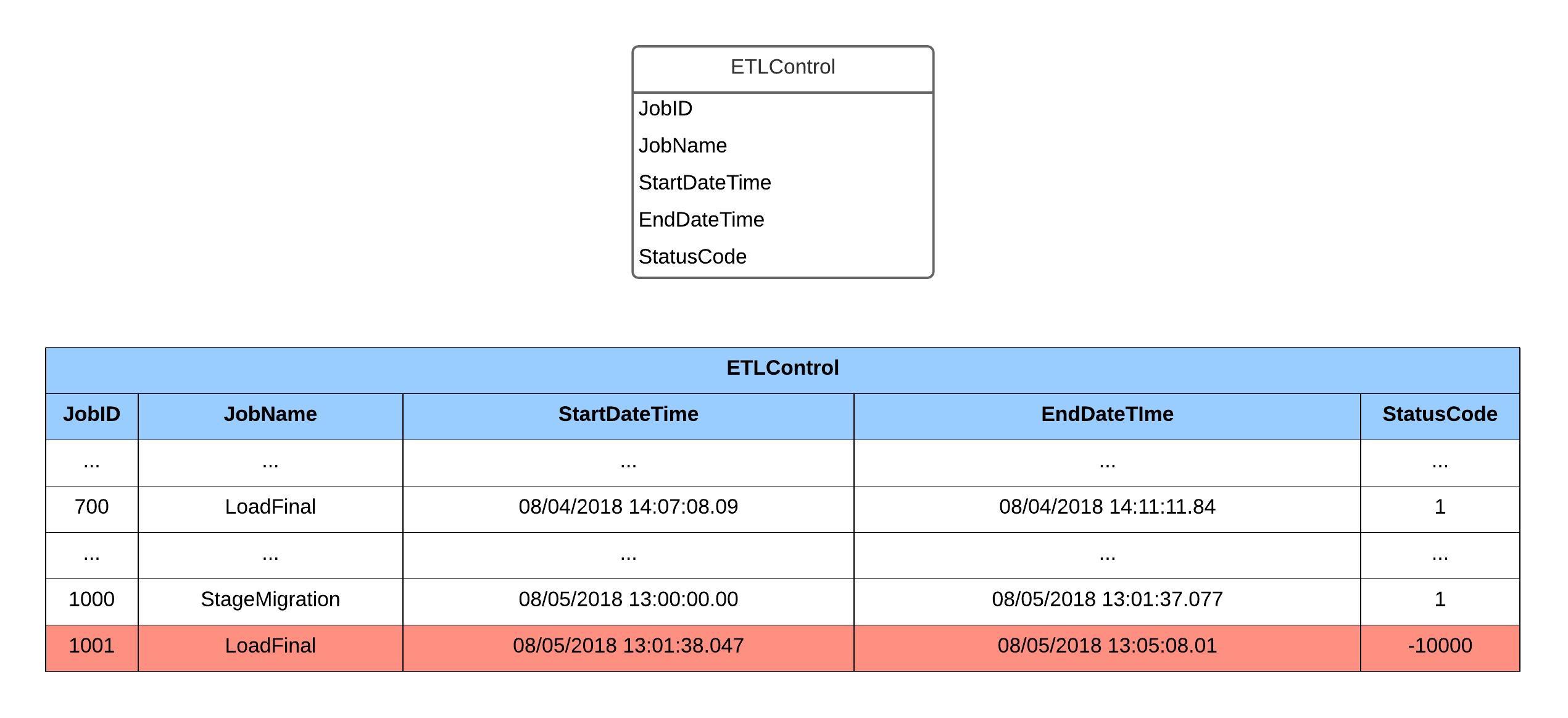
The first thing to be done is to create a control table. The thought here is that every time a phase of your process executes, you will:
- Generate a value for the job ID. It does not need to be a system wide GUID. Often a simple sequence number will do the trick and provides a way to step through the overall process (i.e. do a select on your control table and order it by the job ID and you should see the steps in order that are executed).
- Give the job an easily readable name. It goes a long way to be able to just look at the name and see where the process is going wrong (or right).
- Capture the start and end times. At the minimum, you can generate a metric on how your job is performing. You can answer that question often heard during those processor sharing sessions “how long does your job take to finish?”
- Always have a status code for completion sake. If there is an exception that occurs, capture that value in this field. Also, you will want to have a consistent value to identify success.
- Possibly, add in a status description. I am going to skip it in this example. However, a little bit of descriptive text goes a long way.
In the example given, you can see some job history. The jobs have a start and end time which says, at the very least, they handled exceptions properly (otherwise, one or both of the values would be NULL for that job). Then, there is a StatusCode of 1, which I pick as success follow by a negative value at the very end. Uh oh, the negative value is an indicator for a job exception. Great but I can really use that description field since I do not like to look up error codes.
This all might seem complex but stick with me. Control tables are actually quite common in ETL. It is a good beginning to increased ETL process awareness.
So now, we have a bit of a history and can pinpoint the error occurred at the job level. What about trying to find that record causing the issue?
The Control Fields
Let’s say you are building a system for analyzing tracking information on herds of animals. So, you have animal migration data coming into staging from instruments and want to enrich it with what you can find elsewhere (example: maybe an instrument has a tracker ID on an animal but no detailed information. You then find a MySQL database that has that detailed information about the animal and relates to that tracker ID. You will definitely want to bring the sets together for reporting purposes. It will only help the scientists out).
First, you need to bring that data into staging and want to know it all staged AOK. It is often difficult to go back to ask your data providers to adjust their data sources to include audit/control fields. This is where it will get tricky, so let me table the staging part for right now and focus on the load.

When the time comes to load the data, you will want to know that it made it into the final table too. Like the control table, we will have control fields added onto each staging table. The fields I start with are:
- The job ID that attempted to load the row into the target table.
- The datetime the row is inserted into target table.
- The final status code of whether there is a success, exception, or did not get to process.
During your load, you will:
- Update the job ID field for the row or batch of rows you are processing. This alone will be useful for triage.
- Ingest the data to the target table.
- When there is no issue, update that batch with a success flag along with the datetime.
- When there is a handled exception that prevents the load from completing, then capture the error number into the row that caused the issue. You can continue forward at this point.
- Otherwise (i.e. unhandled exception), your program halts and this is where an abend can happen. If you took a layered approach, you can exit gracefully by capturing the exception into the control table. To combat getting lost in the woods, you should be capturing the stdio anyway, so you will have that to fall back upon.
Reading our example, the job is moving along nicely, and data is being loaded as you can tell by the LoadStatusCode being 1 (for success). Then, you can see there is an issue with a record and the job captures the -10001 status code. Since it is being handled, it moves to the next record and processes as expected till the final record comes in and it is an unhandled exception. The job abends and you are left with a record without a status code but with a job ID! You can use that to at least identify the row in the job ID and then combine that with stdio to get the picture of what went wrong.
You can now fix that piece of data (or code) then restart at the exact point of failure. The job has the components to skip over successfully loaded rows and go after the ones that failed. Once the row is loaded, you can update that row to success and keep moving forward!
A question for you to think of: why put the load metadata into staging? What would happen by putting this information into the target tables? Certainly, you could put the load datetime into the target table but if the job fails and a row is not inserted into the target table, what to do? Do you now start putting error rows with null/default values into the target table you are running reports? The answer is up to your business, but I avoid doing that as many want the target to be in a pristine, reporting ready condition (example: don’t do a statistical average on data that contains defaults then expect your audience to understand).
Back to the staging part
With the concept of loading complete, we go back to that question of your source being able to have those control fields or not. If you can get those addition fields added to the source, great, just follow along the same process of capturing the job ID and status/exceptions. If not, what can be done?
At the very least, you have that control table to utilize. That has a status code field to it which can be used with stdio to give triage a general approach. It will not be able to be re-startable at the row level unfortunately, but you can build it to handle the feed individually (1 job per source feed rather than 1 big job extracting and staging all at once). Fix the feed, then restart at the point of failure.
If you really want that row level auditing, you might build an intermediate table of keys from the source along with the control fields. You would load the keys into the intermediate table first then stage the data, capturing the control information the whole way. Just a warning, this is probably over-engineering the solution.
Final
What is presented is a mere concept of controlling your ETL process in order to handle those “what if” scenarios. There is nothing worse with ETL than having a failure that does not have any information to assist during those 2am wake up calls. There is also the hardship of having to clean everything up from a failure just to re-execute to another failure.
This is not the entire universe, but take these concepts, make them your own, and implement as possible in order to save time, money, and effort. Just a little bit of upfront work will help in the long term.
 Andy’s Neural Works
You must be logged in to post a comment.